This article explains how to log in to your job seeker account. If you're experiencing trouble logging in, please refer to the Login Issues article.
Audience
Job seekers
How to Login
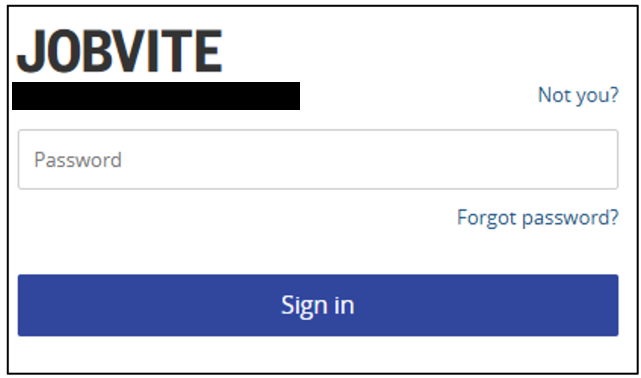
Navigate to https://app.jobvite.com and enter your email address. NOTE: You can also choose to sign in with Google or LinkedIn.

Click Next.

Choose one of the following options:
- Not You – Choose this option if you need to change your email address.
- Password – Enter your password and click Sign In.
- Forgot Password? – Choose this option if you have forgotten your password or need to reset your password. You will receive an email with password reset instructions. NOTE: If you do not receive an email to reset your password, please check your Spam or Junk folder and mark the email as not spam. These emails are sent from no-reply@jobvite-inc.com - please add this email to your safe sender list. If you still haven't received an email to reset your password, your account may not be fully validated. Please click on the following link to register your account using the same email address you applied with: Jobvite - Register
Once logged in, you will see your Applications page.
Change Password
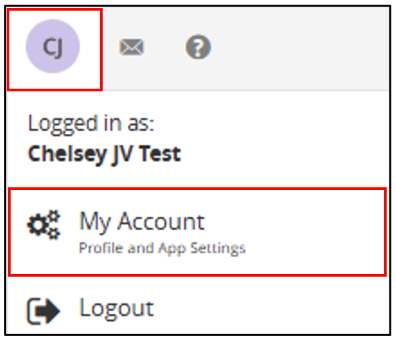
Navigate to the user menu and select My Account.
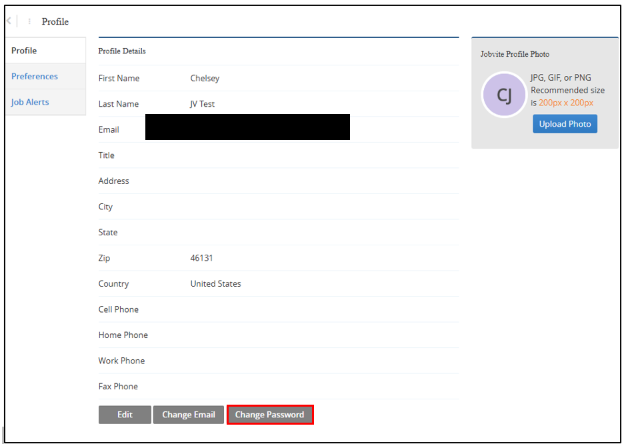
Click Change Password.
On the Change Password pop-up, enter the following information:
- Current – Enter your current password.
- New – Enter a new password.
- Re-type new – Re-type the new password.
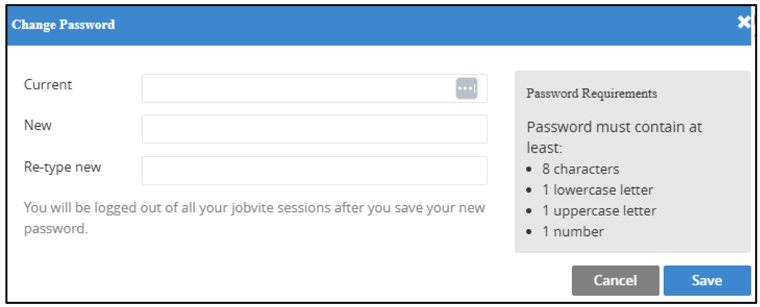
Click Save.
You will be logged out and will need to sign back in using your email address and a new password.
Q&A
Q. What do I do if I forgot my password?
A. For information on logging into your account and resetting your password, please see 'How to Log In'.
Q. I've tried all the steps to reset my password and still can't log in. How can I get access to my jobseeker account?
A. Please reach out to the company you applied to for assistance with logging in to your jobseeker account.
Q. What do I do if I have issues accessing Onboarding?
A. Please contact the company you are onboarding with for assistance.